

Are Your Business Users Ready for Change?
The Human Side of SaaS Transformation
SaaS transformation is usually framed as a technology project.
New systems. New modules. New integrations. New workflows.
But beneath the technology, there’s a far more decisive variable: People.
Even the most perfectly configured SaaS platform (Workday, Oracle, Salesforce, SAP SuccessFactors, etc.) fails when users aren’t ready. The best automation, analytics, and dashboards offer zero value if:
- Employees revert to offline spreadsheets
- Managers bypass new workflows
- Teams don’t trust the new system
This is why readiness is more than a supporting activity — it is the foundation on which the entire transformation stands.
Why Business User Readiness Is Critical: Adoption = Real ROI
When leaders approve multimillion-dollar SaaS programs, they expect:
- Faster processes
- Better data quality
- Improved compliance
- Automation-driven efficiency
- Real-time insights
But none of these benefits occur unless users adopt the system correctly.
Let’s say:
A new cloud HCM system is implemented to streamline promotions and performance management. But managers continue emailing HR or using spreadsheets because they’re unsure how to navigate the new screens.
Outcome?
- HR is overloaded
- Data becomes inconsistent
- Compliance reports fail
- Leadership incorrectly assumes the system is flawed
The real issue wasn’t the technology. It was readiness.
Read more: What is Agentic AI, and how is it Transforming ERP?
The Common Signs of Change Resistance
Resistance rarely appears as outright refusal. It shows up as patterns in user behavior.
How Resistance Appears in Real Life
| Resistance Type | How It Appears | Real Example |
| Friction | Users slow down or struggle to complete tasks | Employee requires 4 tries to submit an expense because the interface feels unfamiliar |
| Fatigue | Too many changes cause overload | After receiving three “system change” emails in a month, users ignore the fourth |
| Missed Adoption | Users bypass the new system | Finance continues reconciling spreadsheets instead of using the new ERP module |
These signals indicate that the people side of transformation was not addressed early enough.
Read more: Why Some Businesses are Unprepared for the Age of Agents
The Readiness Framework for SaaS Transformation
A successful SaaS transformation hinges on four readiness pillars:
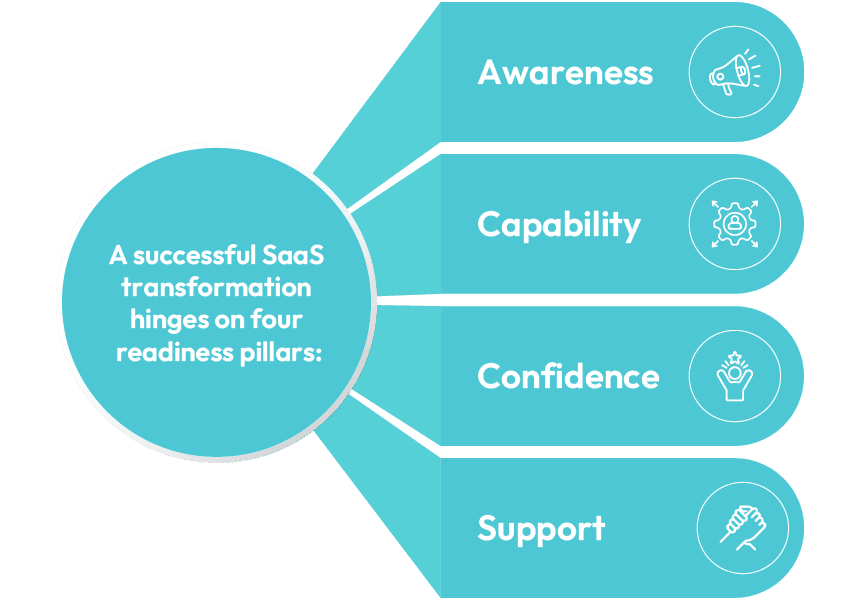
What is the expanded, actionable breakdown?
1. Awareness – Do Users Know What’s Changing and Why?
Awareness isn’t simply announcing a new system. It means explaining:
- What is changing
- Why it’s necessary
- What it means for their role
- What improvements they can expect
Instead of saying:
“We’re upgrading to Oracle Cloud next quarter.”
Say:
“Your procurement process will become 40% faster because manual approvals will now be automated.”
Awareness Checklist
| Question | Yes/No |
| Do users know the timeline? | |
| Do they understand what will improve? | |
| Do they know what old processes will disappear? | |
| Has leadership communicated the business goals? |
Awareness builds alignment, and alignment reduces resistance.
2. Capability – Do They Have the Skills and Tools?
Capability is the practical side of readiness — the doing. Users need to feel they can complete tasks without uncertainty.
Traditional Training Limitations
- One-time workshops fade from memory
- Lengthy LMS courses overwhelm users
- Real workflows are forgotten under pressure
What Capability Actually Looks Like
- Clear in-app walkthroughs
- Hands-on exercises before go-live
- Automated test environments where users can practice safely
- Role-based training (not generic videos)
A payroll manager should practice: Running payroll, validating exceptions and approving runs; not generic “system navigation.” Capability ensures users don’t freeze when faced with real tasks.
3. Confidence – Do Users Trust the New System?
Confidence is emotional, not technical. Even capable users may resist if they don’t trust that the system will behave reliably.
Confidence Blockers Include:
- Fear of making mistakes
- Broken workflows during UAT
- Confusing screens
- Inconsistent system behavior
How to Build Confidence
- Provide a sandbox where users can safely experiment
- Show real-life success examples from other teams
- Ensure continuous testing so workflows never “break”
- Offer guides that appear inside the system when needed
If an approval workflow fails during testing, employees lose trust immediately:
“This is why I prefer the old method.”
Continuous testing restores trust by making the system dependable.
4. Support – Is Help Available After Go-Live?
The real adoption challenge begins after go-live — not during the project.
Forms of Effective Support
- In-app help buttons
- Embedded step-by-step guides
- A searchable help center
- Chat-based assistance
- Office hours with super users
Strong vs Weak Support Models
| Weak Support | Strong Support |
| Users email IT randomly | Clear help channels inside the app |
| Delayed responses | 24/7 in-app workflows + searchable FAQs |
| No ownership | Dedicated change champions |
| Users depend on memory | Real-time guidance for every workflow |
Support ensures long-term adoption — not just go-live success.
Measuring Readiness: The Metrics Leaders Should Track
You can’t manage what you can’t measure.
Readiness requires ongoing quantitative and qualitative measurement.
Quantitative Metrics
| Metric | What It Tells You |
| Workflow completion times | Are users struggling? |
| Error rates | Are tasks being done correctly? |
| Feature usage | Are key capabilities being adopted? |
| Help-trigger frequency | Where are users confused? |
Qualitative Metrics
| Method | Insights Gained |
| Surveys | User sentiment and fears |
| Focus groups | Real examples of friction |
| UAT feedback | Broken processes and UI pain points |
A data-driven view helps leaders act before adoption issues escalate.
Enabling Readiness Through Technology
Technology accelerators turn readiness from manual effort into automated support.
- In-App Guidance: Users learn inside the system — not through static PDFs.
- No-Code Tools: These allow business users to automate repetitive tasks, validate workflows, and manage change rapidly without IT reliance.
- Continuous Testing: Ensures that updates, patches, or configurations never break key workflows — preserving user trust.
Use Case:
A Workday update breaks a compensation workflow. Continuous testing catches the issue before users log in the next morning.
This prevents confusion, tickets flooding, loss of confidence, and more.
A Readiness-First Approach in Action
A global retail enterprise rolled out a cloud ERP across 18 countries.
Initial user tests showed:
- 30% error rate in purchase creation
- Confusion in 5 out of 7 finance workflows
- Low confidence from regional teams
After adopting the readiness framework:
| Before | After |
| High training hours | Reduced training needs by 45% |
| Frequent errors | 62% decline in workflow mistakes |
| Low confidence | 80% user satisfaction score |
| Long onboarding | 40% faster system adoption |
The breakthrough wasn’t more training — it was a readiness-first mindset.
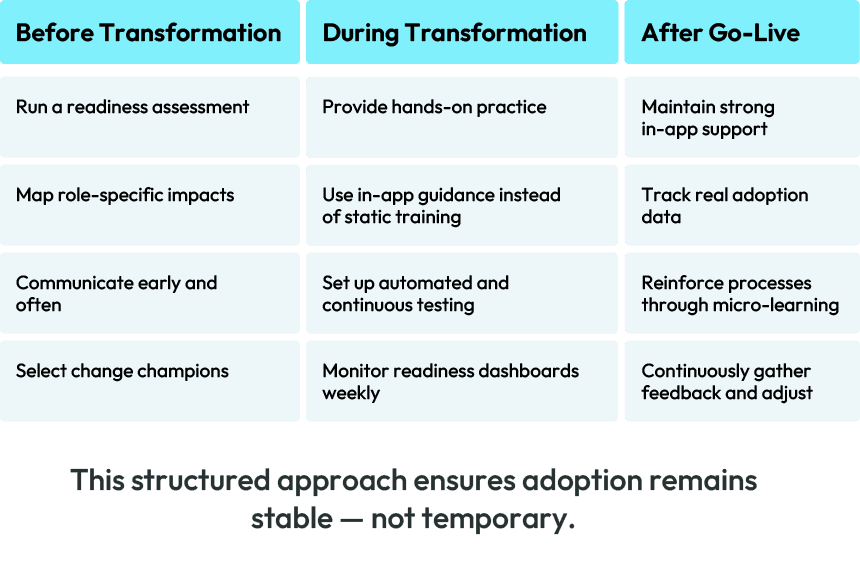
Action Plan for Leaders
Build a Culture Ready for Continuous Change
SaaS isn’t a one-time transformation, it’s permanent evolution.
Your teams must be equipped not just for go-live, but for every change that follows.
A readiness-first approach ensures your business users:
- Understand the change
- Feel capable
- Trust the system
- Receive ongoing support
When readiness becomes part of the culture, adoption becomes natural — and SaaS investments consistently deliver value.