
Oracle Cloud Financials 26B is a substantial release, with 129 changes across 12 modules, previewing on May 1st, 2026 ahead of production go-live on May 15th, 2026.
For finance and IT teams, the challenge isn’t just tracking Oracle Financials 26B new features—it’s deciding what needs attention, testing, and change management inside that two‑week window. Instead of sifting through lengthy Oracle Financials cloud 26B release notes, teams need a clear view of which updates affect their specific configurations, integrations, and business processes in the Oracle Cloud Financials 26B release.
Opkey’s 26B Financials Advisory and AI-powered Release Advisor simplify Oracle Financials release 26B notes by turning the long feature list into a focused impact and risk-based testing plan tailored to your environment.
With guided insights on Oracle Financials 26B and practical recommendations mapped to Oracle Financials 26B new features, you can prioritize what to test, who to involve, and how to prepare for the Oracle Financials release 26B date. This helps customers move from passive reading of Oracle Financials Cloud 26B release notes to active, confident execution of a release strategy that protects business continuity.
Big themes in Oracle Cloud Financials 26B
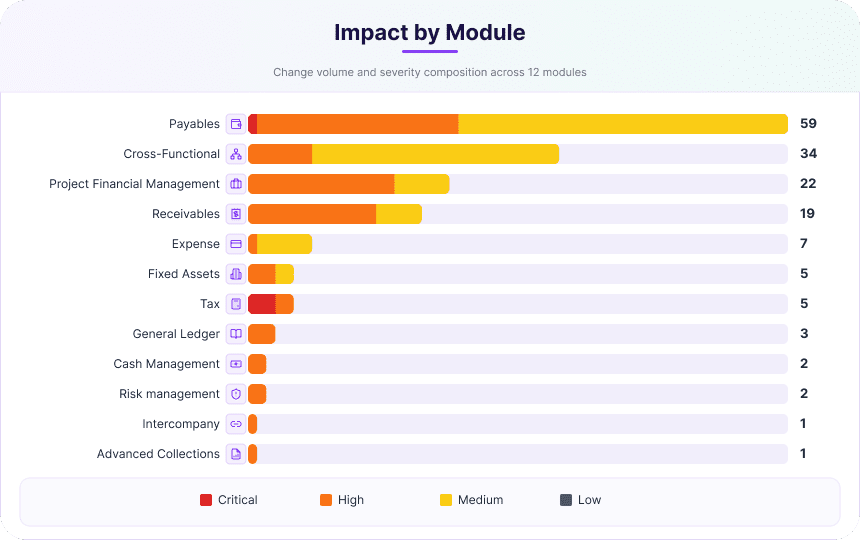
Oracle Cloud Financials is the backbone for global, automated finance operations, and 26B continues in that direction with changes across Payables, Receivables, Project Financial Management, Tax, Cash Management, Risk Management, and more. Opkey’s advisory snapshot breaks this down as 129 total changes across 12 modules, 91 changes that require action, and 38 auto-enabled changes that will go live automatically and still need impact review.
Stronger controls and payment governance
- 26B includes changes that directly affect how money moves and who can influence that movement. Additional Governance for Bank Account Transfers and Ad Hoc Payments in Cash Management is flagged as a high-severity change requiring configuration, reflecting tighter control expectations for high-risk transfers.
- Virtual Card Reconciliation with Multiple Settlements in Payables appears as another high-severity item with configuration required, aimed at improving card program reconciliation and reducing manual work.
- For finance, treasury, and internal audit teams, these are not just feature updates. Opkey’s advisory tags them for regression testing and highlights them in the “What To Do This Week” section, so owners know they need attention before 15 May.
Automation and intelligence in core finance
Several Financials 26B updates focus on automating previously manual or error-prone work.
- In Payables, Landed Cost Line Classification of Payables Invoices from Files is a medium-severity change that improves how additional costs are classified for imported invoices, reducing rework in AP and downstream reporting.
- In Receivables, features such as Automated Revenue Recognition for Sales Invoices with Prepayments, Revenue Adjustments Driven from Invoice Changes, and Standalone Selling Price Repository Population using REST appear as high-severity items, with implications for revenue accounting accuracy and audit trails.
- These are the kinds of changes that can quietly alter posting rules or recognition of logic. In the advisory, they show up with pre-assigned testing priority and are rolled up into module-level impact views, so Finance and IT can see the scale at a glance.
Risk and compliance visibility
Risk and compliance teams also see meaningful updates in 26B.
- Changes Are Made to Business Objects in Risk Management appears as a high-severity change requiring configuration, signaling updates that can affect how critical data and configurations are tracked.
- A new Advanced Access Requests subject area in Risk Management is also classified as high severity, expanding reporting capabilities on who is requesting access and how that ties to controls.
In Opkey’s advisory, these changes are grouped clearly in the Impact by Module view, so they do not get lost among UI and Redwood enhancements.
Why 26B is hard to digest manually?
Oracle’s quarterly update model means Financials customers handle four releases per year, with preview and production dates tightly scheduled and a standard testing window.
For 26B, the advisory maps changes across Payables, Cross-Functional, Project Financial Management, Receivables, Expense, Fixed Assets, Tax, General Ledger, Cash Management, Risk Management, Intercompany, and Advanced Collections.
Each change can differ in whether it is auto enabled or requires opt-in or setup, whether it touches configuration, controls, or user experience, and how much regression testing is really warranted versus a spot check or simple monitoring.
Manually triaging 129 items to figure out which 91 changes require action, what 38 auto-enabled items might break something, and where to spend limited testing capacity is exactly where teams lose time.
What Opkey’s 26B Financials Advisory adds
Opkey’s Oracle Fusion Financials 26B Advisory is designed to sit between Oracle’s official “What’s New” documentation and internal planning, turning a long list of features into an impact and testing lens.
In one dashboard-style PDF, it gives teams an Executive Snapshot, a Severity and Testing Priority breakdown, a “What To Do This Week — By Role” section, an Impact by Module view, and dedicated sections for AI and agentic features, opt-in expiry, and enablement breakdown.
Here is a sneak peek!
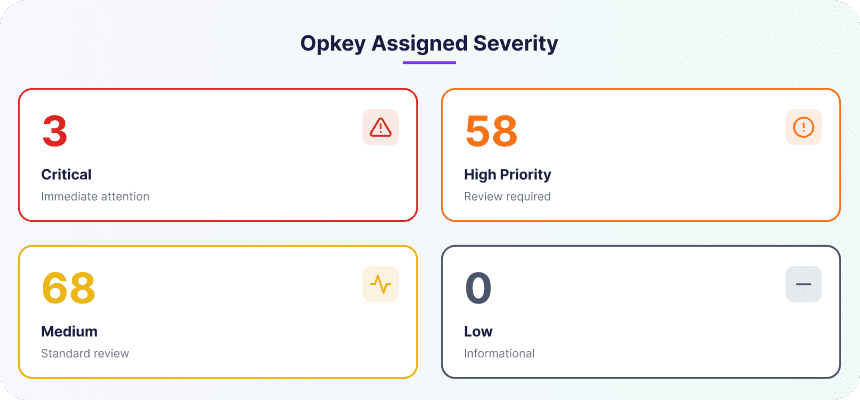
The advisory identifies 3 Critical changes, 58 High changes, and 68 Medium changes, then maps them to test levels such as full regression, spot check, or monitor only.
It also organizes ownership across Finance and Tax, IT and System Admin, Payables and AP, and Project and Receivables teams, so each group sees what it owns rather than relying on one giant shared spreadsheet.
How Opkey Release Advisor takes it further
The advisory PDF is a concise version while Opkey Release Advisor is where the detail becomes interactive. Release Advisor has full context on all 129 Financials 26B changes, including severity, configuration requirements, enablement type, and testing priority.
It also lets teams query the 26B catalog in plain language using prompts such as “Which 26B changes will affect our Payables invoice processing workflows?” or “Which opt-ins expire with this release and what happens if we miss them?”.
Release Advisor also helps teams generate test plans and surfaces AI and agentic features such as Ledger Agent for General Ledger, Payables Agent for invoice ingestion, and Payments Agent for payment options and execution, all of which may require change management and leadership sign-off rather than only configuration work.
Where the PDF gives a curated view, Release Advisor helps teams slice 26B by module, role, severity, enablement, or test level and turn those slices into action.
A quick impact snapshot
A few examples show how the impact view changes the conversation.
- E-Reporting for France is tagged as Critical, auto-enabled, and included in both Finance and Tax and Payables action cards, making it clear that it needs attention before go-live.
- Japanese Corporate Tax Schedule 16 Reports Compliance is also marked Critical and auto-enabled, surfacing it as an immediate compliance item for affected teams.
- Lease Payables Processing for Approved Payments is flagged as High severity with configuration required, while Turnkey Indirect Tax Automation with Thomson Reuters is also marked High severity and configuration-dependent.
In the advisory, these features appear not just as rows in a list but as part of Critical Compliance, role-based actions, AI and agentic feature reviews, and opt-in expiry planning.
How to use this for 26B planning
A practical way to approach Oracle Cloud Financials 26B release is to start by downloading Opkey’s Oracle Fusion Financials 26B Advisory from the Oracle Advisory landing page and reviewing the Executive Snapshot with finance and IT leads.
From there, teams can use the “What To Do This Week — By Role” section to assign owners across Finance and Tax, IT and System Admin, Payables and AP, and Project and Receivables.
The next step is to open Opkey Release Advisor and use the prompt guide to explore 26B in more detail by module, severity, enablement type, or test level.
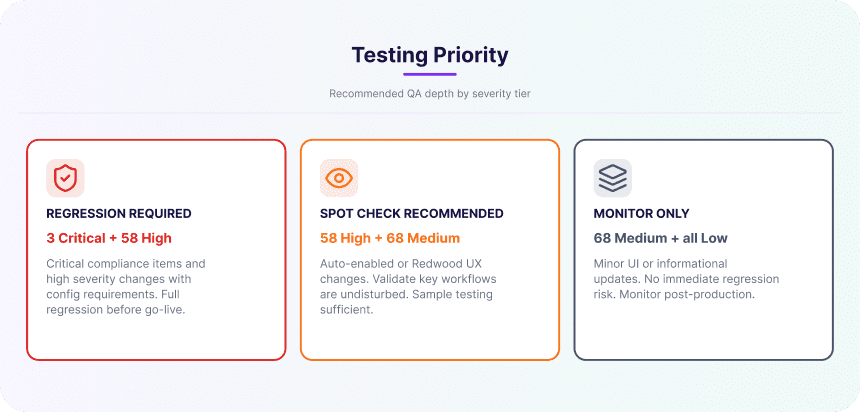
That makes it easier to turn the release into a focused test and change plan, concentrating regression effort on Critical and High items while using spot checks and monitoring where appropriate.
Oracle Cloud Financials 26B is a busy release, but it does not have to become a fire drill. With the right impact lens, teams can see which of the 129 changes demand attention, where compliance risk sits, and how to structure testing without overloading teams.
Opkey’s Oracle Fusion Financials 26B Advisory provides a structured, role-based overview, while Release Advisor helps teams query the full change catalog, generate test plans, and understand impact in the context of their own environment.