Most Workday teams know the feeling: every release window shows up like a surprise audit. Systems are stable today, but a single missed retirement, API change, or UI shift can derail payroll, reporting, or close; and suddenly everyone is working nights just to keep the lights on.
For 2026R1, you do not need another fire drill; you need a clear path. Instead of scrambling through release notes and spreadsheets, you can lean on Opkey’s expert advisory, readiness checklist, and AI‑powered automation to turn this release into a predictable, low‑stress cycle.
From Fire Drills to a Repeatable Playbook on Workday 2026R1
Workday releases can feel overwhelming, but many teams still face the same cycle: rushed testing, unclear ownership, and post‑go‑live surprises. The issue isn’t just the upcoming Workday changes; the lack of structure can be challenging when the focus is on, protecting what already works, and deciding what to adopt and when.
Workday 2026R1 introduces a mix of fixes, retirements, auto‑on updates, and opt‑in features across HCM, Financials, Payroll, Integrations, Security, and Reporting. Treating all of these changes as equal is what creates release fatigue. The teams that stay calm don’t “test everything”, they run a repeatable readiness model that blends impact analysis, targeted testing, and continuous enablement.
Download the Workday 2026R1 Readiness Advisory & Checklist
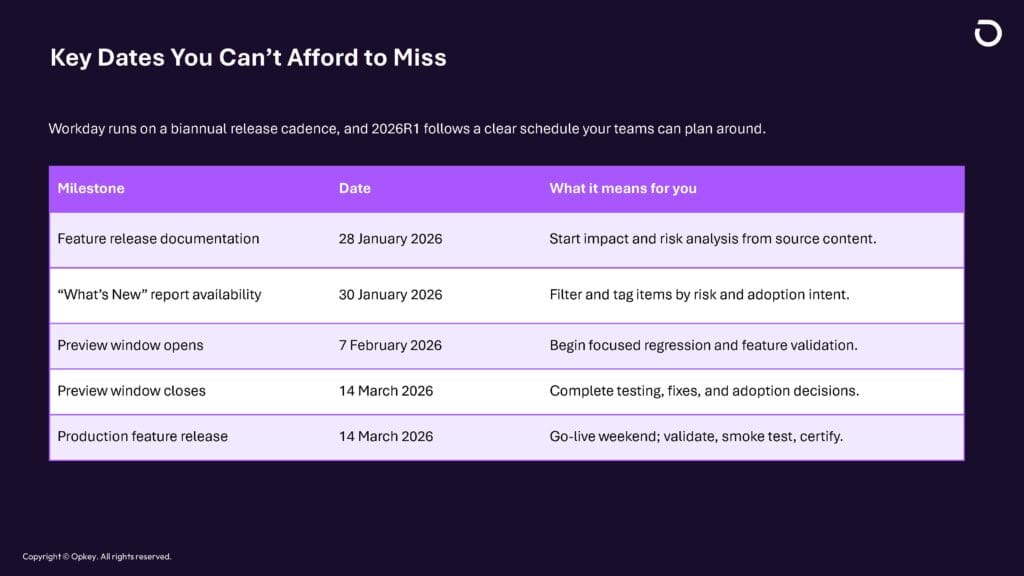
This five‑week Preview window (7 Feb–14 Mar) is your critical release preparation period. It exists to validate what’s changing; not to rescue accumulated tenant debt at the last minute. Opkey’s advisory and checklist give you a step‑by‑step way to use that window effectively, with clear actions before, during, and after the release.
Stay on top of the 2026R1 schedule with Opkey’s advisory
From Release Notes to Decisions: How Opkey’s Advisory Helps
Most Workday breakages don’t come from headline features; they come from silent breakpoints like retired APIs, deprecated report data sources, changed security domains, and UI shifts that quietly invalidate job aids. These risks are scattered across Workday release notes, PDFs, and “What’s New” reports, making it hard to see what truly matters.
Opkey’s Workday 2026R1 Release Advisory supports you by:
- Highlighting high‑risk changes across integrations, reporting, security, and core business processes.
- Distinguishing critical vs informational items, and auto‑delivered vs setup‑required features.
- Mapping where retirements and deprecations will break existing workflows if you don’t act.
- Suggesting Now / Next / Later adoption guidance for opt‑in and AI‑driven features.
This advisory works alongside the Workday 2026R1 Release Reference document, so every recommendation traces back to Workday’s own materials.
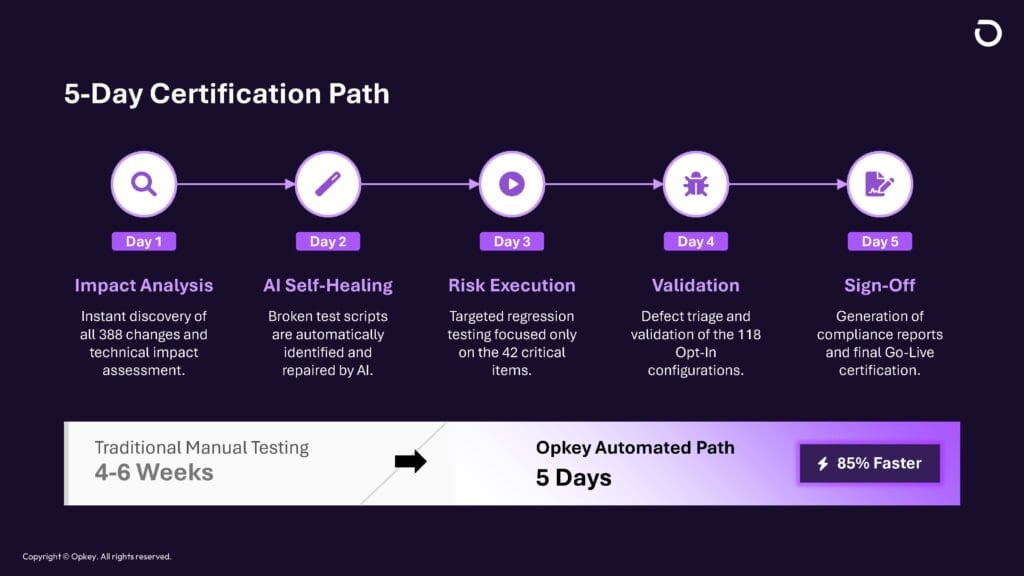
The 5‑Day Workday 2026R1 Certification Path
Yes, you heard it right! 5 Days...
If you rely on manual testing, Workday release certification can easily consume 4–6 weeks and still leave blind spots. Opkey compresses this into a focused 5‑Day Certification Path that covers what matters most for 2026R1.
Day 1: Impact Analysis
Automatically identify which business processes, integrations, reports, security roles, and custom configurations are affected by 2026R1 changes in your tenant. This replaces guesswork with a concrete impact map.
Day 2: AI‑Assisted Test Healing
Opkey’s agentic, no‑code platform uses AI‑powered self‑healing to update existing regression tests to reflect UI and process changes, so you don’t lose coverage every time Workday moves a field or step.
Day 3: Targeted Risk Execution
Run regression only where the risk is highest: retired APIs, critical payroll/time changes, key Financials data sources, and core HCM flows. This turns the truly critical items into a focused, manageable test set instead of an endless script list.
Day 4: Validation & Adoption Readiness
Validate opt‑in features and configuration changes, especially new AI capabilities and setup‑heavy items, and prepare your enablement materials (job aids, guides, in‑app help, stakeholder comms). This is where you decide what to go live with now versus later.
Day 5: Certification & Sign‑Off
Generate readiness reports, coverage metrics, and risk dashboards that give stakeholders go‑live confidence and auditable evidence for your Workday 2026R1 release.
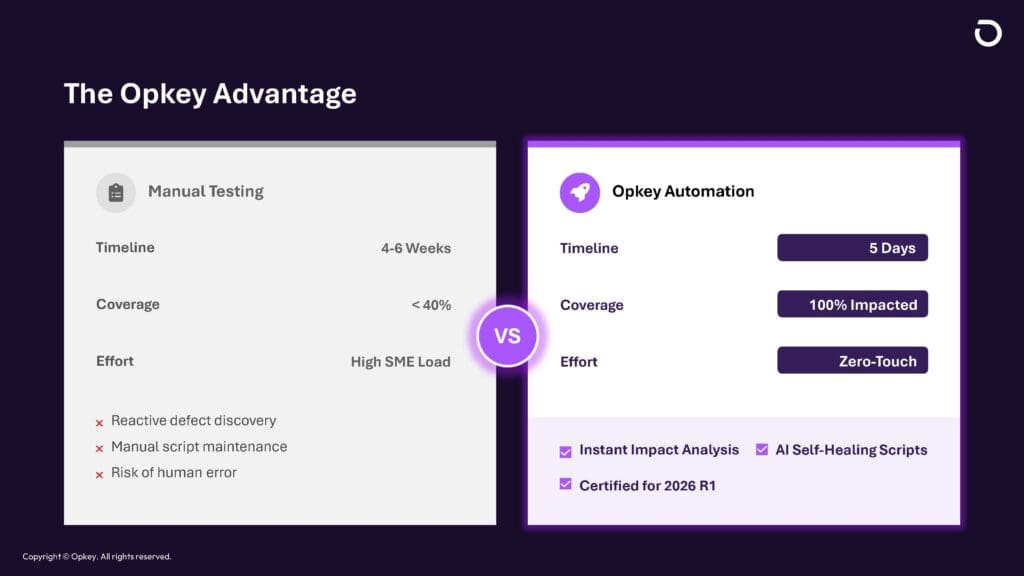
Why Workday Teams Choose Opkey for 2026R1
Opkey combines advisory, automation, and analytics into a single platform, built specifically for complex SaaS releases like Workday.
With Opkey, Workday teams get:
- Impact analysis in minutes – Know exactly what to test and where you’re exposed.
- Pre‑built accelerators – Thousands of automated test cases and AI‑powered self‑healing scripts tuned for enterprise apps.
- No‑code test automation – Empower HR, Finance, and functional users to contribute to automation in hours, not weeks.
- Certified Workday partner support – Expert guidance across HCM, Finance, Payroll, Security, and Integrations in one unified platform.
- Real‑time dashboards & alerts – Always‑on visibility into test status, risk, and release readiness.
Stay Ahead of the Workday 2026R1 Release
The Workday 2026R1 production date is approaching, and the five‑week Preview window is your chance to get ahead instead of playing catch‑up.
Let Opkey’s AI‑powered, no‑code automation handle the heavy lifting while your team focuses on strategic decisions and adoption.
Get a demo now to see how Opkey keeps your testing, impact analysis, and readiness reporting continuously up to date.